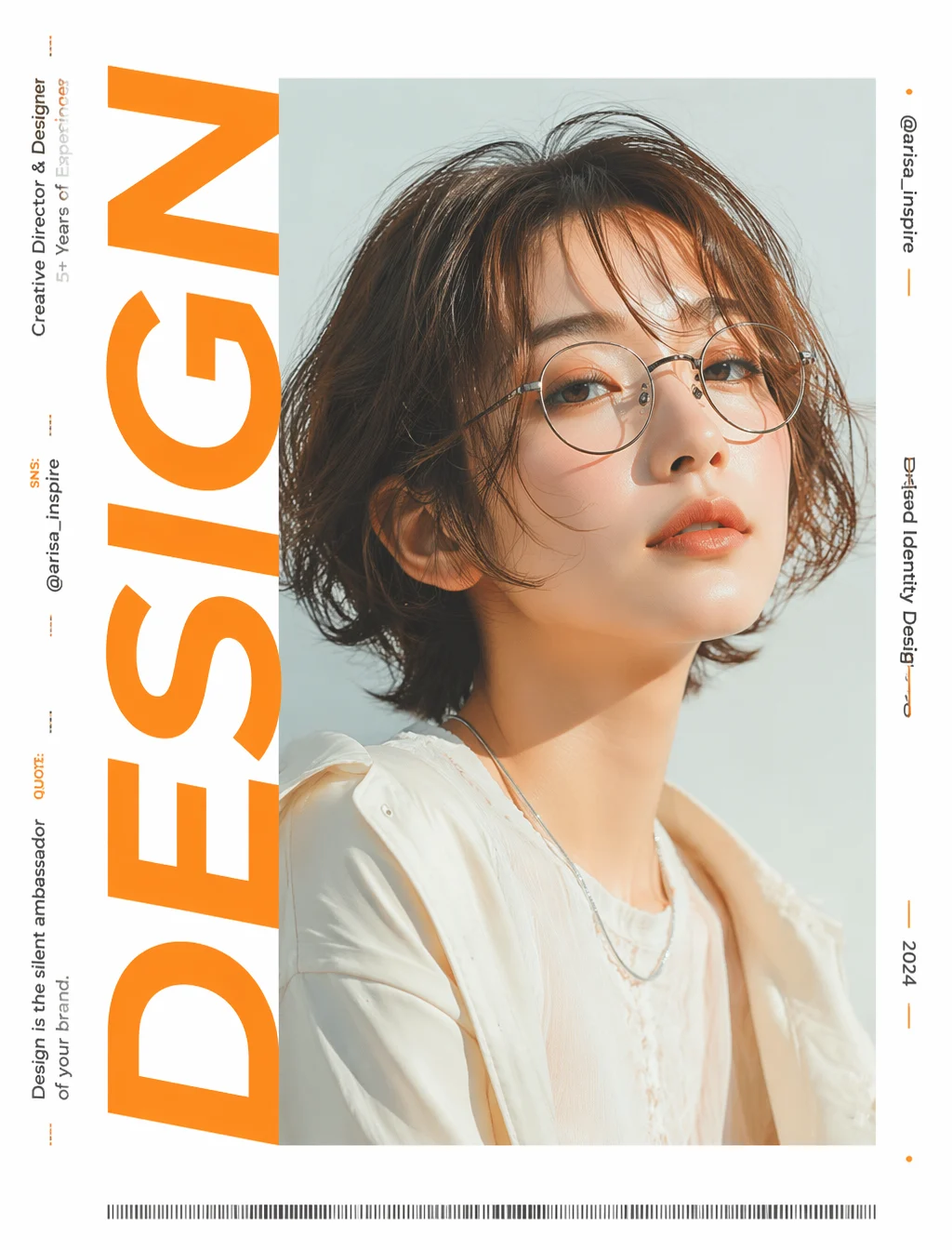
You are a top art director and Japanese typography designer. Please use the following content as "production steps," accumulating them sequentially from STEP 1 to complete a 4:5 aspect ratio live-action editorial ad poster. Each step should build upon the results of the previous one.

[Attachments] 1st image = SNS profile screenshot, 2nd image = photo of the person or avatar image

━ STEP 1 | Decide on a single word for the title ━
・Read the title, self-introduction, and field from the screenshot, and choose an English word that symbolizes this person (e.g., design-related → DESIGN). Do not use their name. This word will be the main subject.

━ STEP 2 | On a pure white background, rotate the word 90 degrees counter-clockwise and place it horizontally on the left side ━
・Background is pure white
・Rotate the selected word entirely 90 degrees counter-clockwise, so it is horizontally inverted (text is horizontally slanted)
・Place this huge horizontally inverted text, starting from the left side of the screen, to occupy the full height of the screen in an extra-large size

━ STEP 3 | Create a "text + block" clipping mask ━
・Do not use the photo in this step yet. Only create the mask (template for clipping)
・Add a square block with the same vertical width as the huge horizontally inverted text created in STEP 2.
Overlap this square block with the end of the huge horizontally inverted text, and extend the horizontal width of the block to the edge of the screen.
However, do not change the size of the text created in STEP 2; only extend the horizontal width of the square block as much as possible.
・"Merge" these two shapes to create a clipping mask.

━ STEP 4 | Place the person's image over the entire screen and clip it with the mask from STEP 3 ━
・Enlarge and crop the person's image from the attachments so that the face occupies most of the screen, and place it over the entire screen
・Clip this photo with the mask shape created in STEP 3 (perform clipping). The photo is only visible inside the mask, and the inside is filled with an uninterrupted photo.

━ STEP 5 | Arrange small text in the remaining space ━
・On the image completed in STEP 4, translate the information read from the screenshot into English and arrange it.
・On the left and right sides of the STEP 4 image, create solid white areas for arranging the information read from the screenshot.
・Small text is also rotated 90 degrees counter-clockwise (horizontally inverted), flowing vertically linearly along the white space (do not place horizontally).
・Left side: TITLE = Person's name / Role / Experience / Social media, short introductory quote / Right side: @username / Project name / Western year
・Avoid excessive stacking, pay attention to balance when arranging.

━ STEP 6 | Add finishing elements ━
・Add a thin horizontal barcode-style graphic at the bottom. Adjust the white space with minimal decoration such as small dots or lines.

[Texture common to all STEPS]
・The person's photo or avatar from the attachments should be treated as "inspiration for the person's image." Do not directly copy or reproduce the face, but inherit characteristics such as the atmosphere, hairstyle, hair color, glasses or small items, clothing style, and softness of expression.
・If the attachment is an illustration or character avatar, also read characteristics such as color usage, hairstyle, glasses, and atmosphere, and convert them into a live-action model that reflects these characteristics.
・Avoid an overly AI-generated feel, creating natural expressions, skin, hair, posture, and clothing texture as if from a real advertising shoot.
・Use bright, high-key lighting with a sense of transparency (no dark interiors or dull gray).
・Redesign the color scheme based on the screenshot source into an advertising style, setting an eye-catching accent color.
・Avoid ordinary business attire, adopt a unique styling that matches the worldview.
・Aspect ratio 4:5, high resolution, fashion ad quality.